






















GoldenRoo Login Australia and Sign Up Page
An account at GoldenRoo will provide all Australian users with access to the casino, wallet, bonuses, VIP and loyalty program, settings for your profile, and transaction history. The registration and login process may be performed on the website, but the same account can also be accessed from a smartphone using the casino’s Progressive Web Application. From the section of the user’s profile, it is possible to manage your personal data and verify your account.
Setting Up Your Casino Account
Making the GoldenRoo account begins with clicking the Sign Up button in the top right-hand side of the website. After that, you get the sign-up form, which appears directly on the casino’s website homepage.
The first thing that you will be asked to provide in the form is your email address, password, and your country. If you are from Australia, then Australia is selected in the country section. There is also an option to add a GoldenRoo promo code. Here’s a step-by-step guide:
- Type in your email address and make up a password, which will be used for subsequent GoldenRoo logins.
- Choose your country and enter any promo code, if possible.
- Indicate that you are an adult person, agree to all policies provided and continue.
- Fill in your first and last names, date of birth, gender, address, city, postcode and telephone number in the following registration form.
- Double-check all information provided and click Save. The registration process finishes by confirming the successful creation of your account.
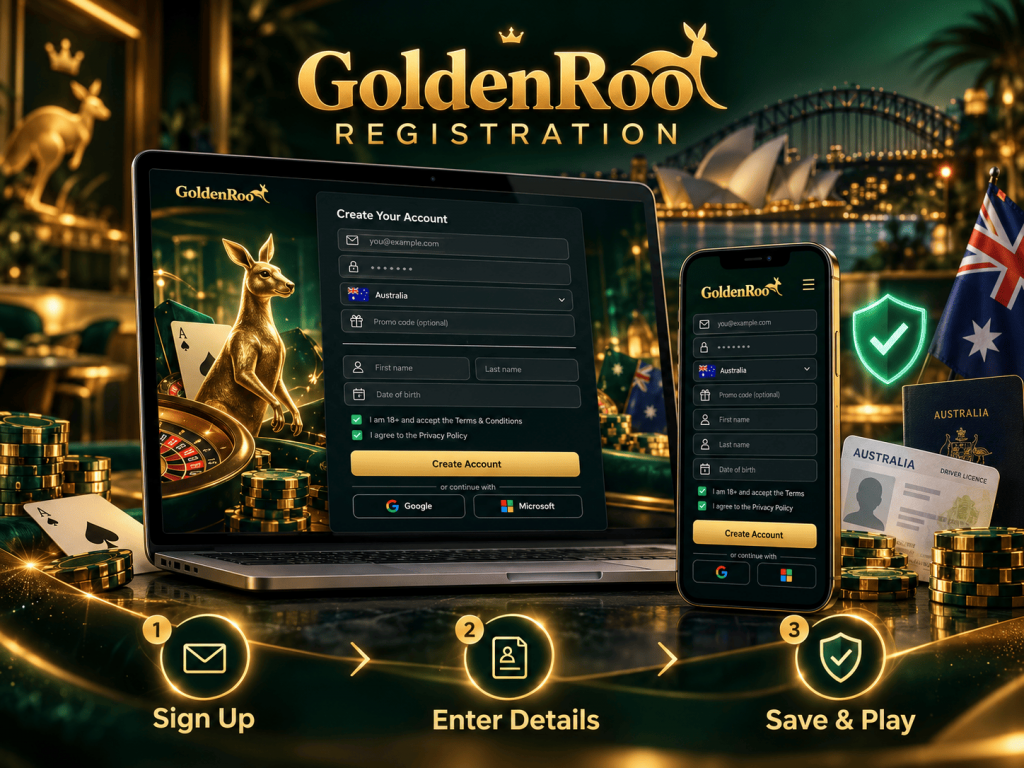
There are also Google and Microsoft buttons available on the very first sign-up form. Also, your personal information should be accurate when registering. If at some point, Golden Roo decides to verify your account, the personal information filled out at the registration stage should match your documents.
GoldenRoo Login
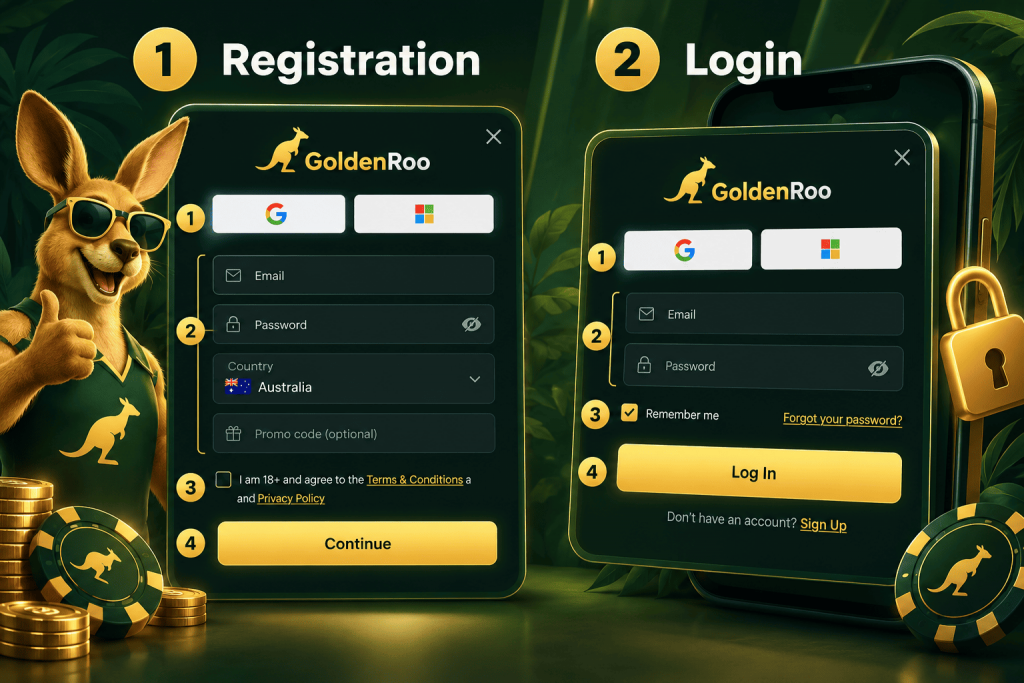
Returning AU players have an opportunity to enter their GoldenRoo profile through the Log In button that is present at the top of the website. The login box will appear with some of the login details and multiple account access choices.
- Provide the e-mail used to register for your profile.
- Then, enter the password for the account and click the eye symbol if you need to see what was entered.
- Tick the box if you want the website to save your login details to log into the account automatically next time on this device.
- Press the button to perform a login using the provided information.
Also, there are the Google and Microsoft buttons in the login box for those people who registered using either of these ways. Once you have successfully logged in, you can then start using the services provided by your GoldenRoo account, such as the casino lobby, games, wallet, and promotions.
However, if your login is not working, make sure to double-check whether you have used the correct credentials.
Account Recovery
In case you forget your GoldenRoo password, there is a possibility of resetting it through the login window itself. Click on Forgot your password? beneath the password box to start the reset process.
The recovery form requires the entry of the email linked to the existing account. Input it into the field and click on Send. According to the casino, your new password will be sent to your email address.
- Pull up the GoldenRoo login window and click on Forgot your password?.
- Input the email address you used during registration.
- Click on Send to initiate the recovery process.
- Go to your inbox to receive the letter, and also check your spam or junk folders.
- Perform a login using the new credentials and save them for later use.
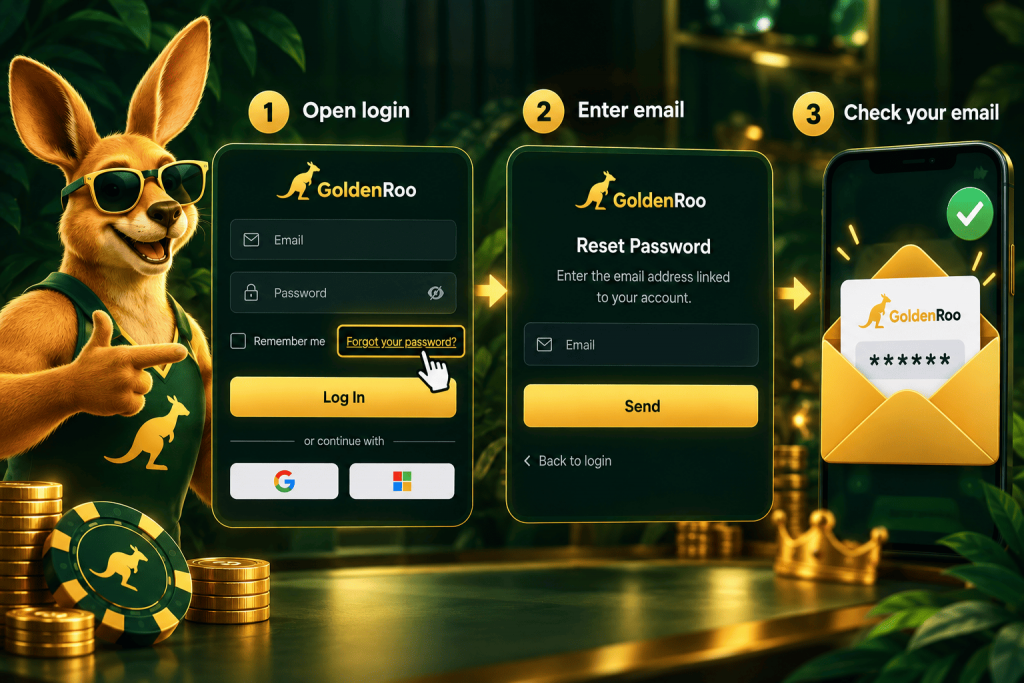
If you do not have access to the email anymore, get in touch with the casino support team for help with recovery. Also, ensure you use the email address registered when signing up because the process of recovery is dependent on the registered contact information.
In the event that the reset email doesn’t come through, make sure that the address entered is correct before trying again. Do not disclose your credentials or recovery information to any other person, and only use the official portal when handling your logins.
Golden Roo Verification for Australian Players
GoldenRoo AU might ask you to verify your KYC information to establish your identity and residency. There is a verification section that appears in your profile and, subsequent to signing up, its status usually says Verification pending.
According to GoldenRoo, the process is necessary for customer verification and prevention of any financial crimes or money laundering. The full KYC process is mandatory if:
- your lifetime deposits are greater than 5,000 EUR;
- you make a withdrawal request;
- your transaction(s) was deemed suspission.
The level of due diligence might differ based on the customer and transaction. As for verification, you might have to provide your government-issued ID, like a passport, ID card, or driver’s license, accompanied by a selfie where you hold the said document.
GoldenRoo Australia may also ask for residence confirmation, for example, a bank statement or utility bill from the last three months. Your name must be consistent across all provided documents, and your ID has to be valid for at least three more months.
Ongoing verification could temporarily limit your access to withdrawal services or some other account features until the process is finished. Additional identity checks are possible prior to a withdrawal being processed, including a verification phone call. All rejected documents are marked as such, with an explanation in an auto-created support ticket.
GoldenRoo Progressive App Login on Android and iOS
The platform can be accessed on mobile via the Progressive Web App (PWA) with no need to download extra software.
On an Android phone, you will be able to add the website to the home screen of your smartphone, where the installation feature is offered. Once done, just click on the Golden Roo icon and then input your registered email address and login credentials.
If you are using an iPhone, all you have to do is open the GoldenRoo page in the Safari browser and click on the Share feature to add the website to your smartphone’s home screen.
After adding the PWA to your home screen, it becomes easy for you to sign in to the GoldenRoo account using the same login credentials you use on the website.
Install
Profile and Features
Once you enter GoldenRoo, the profile area is where all your essential management tools are located. On the left-side menu, you will find Profile, Bonuses, Wallet, Cashback, and History. The main area changes according to the tab you have chosen.
Profile allows you to view and edit your personal information like your name, birthday, country, address, postcode, telephone number, and registered e-mail. Profile contains the tabs for Verification and Security. The Security tab allows you to change your password, which should contain at least eight characters, including a capital letter, a number, and a special character.
Bonuses display your free spins, your current bonus balance, and your bonus queue. Here, you can also enter a promo code even after registration. The Wallet tab shows you the balance you have at the moment, with the Deposit button, where you can enter a promo code prior to depositing money. Cashback indicates the current level of loyalty, the percentage and weekly cashback limit, as well as additional levels of loyalty and their respective rates.
Finally, the History section allows viewing transactions and filtering them by date, amount, transaction type and status. Tabs for Betting and Game Rewards are provided separately.
How to Close an Account?
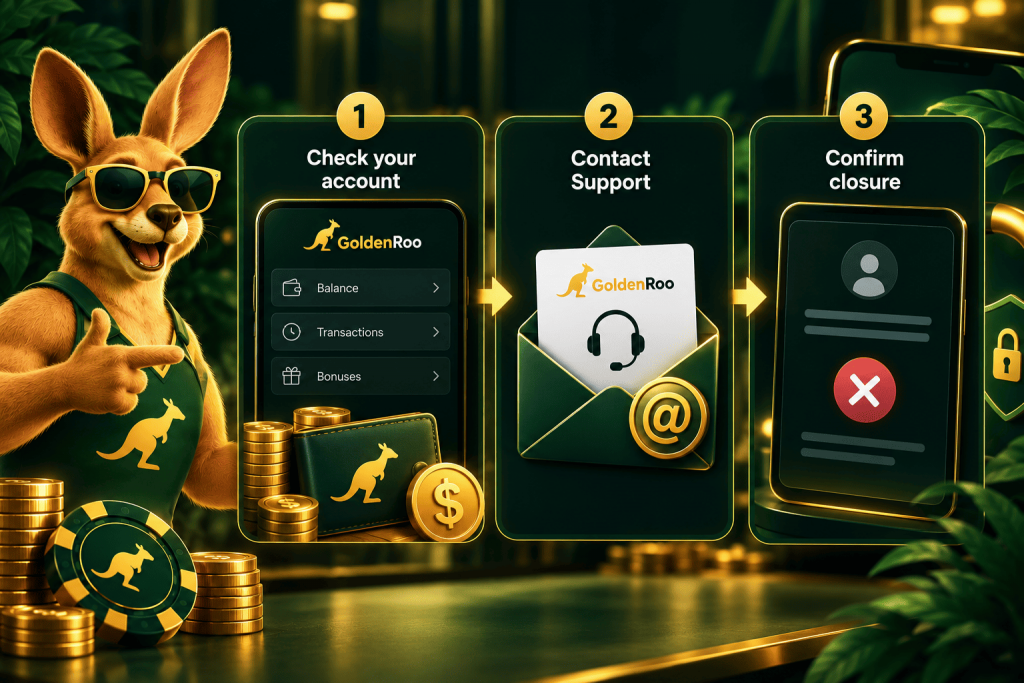
The close account feature is not available in the GoldenRoo profile section after a successful login. Should you wish to do so, the Terms and Conditions advise you to get in touch with Customer Support through an email sent from the email address registered with the casino.
It is important that you check your balance and any ongoing transactions prior to closing your account. According to GoldenRoo’s terms and conditions, unused and cleared funds may be withdrawn, but the closure enables you to withdraw your entire balance.
If you experience any problem accessing the casino or if there are issues with security, you should contact the casino for assistance, not attempt to open another profile, since you are allowed to register for only one at Golden Roo AU.
GoldenRoo Login Help and Support
If you find it impossible to log into GoldenRoo, first ensure that the right registered email address and password have been entered. For login credentials recovery, use the link provided on the login window to create a new one.
If all the credentials have been entered correctly, and yet you cannot log in to your account, refresh your page and ensure that you have a solid internet connection. If there is still no improvement, you might consider clearing browser data as well.
If this persists or there are any other problems related to your account, please contact GoldenRoo customer support via live chat. While communicating, please provide your registered email address because GoldenRoo uses this address for identification of its customers.
In case you feel that your account or registered email address has been accessed by an unauthorised person, you must inform Golden Roo straight away, as per the Terms.
GoldenRoo Login FAQ
What information is required for registration?
In the casino registration form, you will have to provide your email and password. You will then need to specify additional information, including your first and last name, date of birth, country, address, city, postcode and phone number. You must also confirm that you are an adult and agree with the relevant policies.
How to recover your password?
From the login page, click on the “Forgot your password?” option, enter your email address and press “Send”. Then follow the instructions in the email you receive.
Is KYC mandatory?
KYC may be required to verify your identity and address. Full KYC is required when a withdrawal is requested, when lifetime deposits exceed 5,000 EUR, or when a transaction is considered suspicious.
What can be accessed upon my login?
After a successful login, you can access your wallet, casino games, bonuses, cashback and loyalty program. You can also manage personal information, security options and other account settings.
How can I close my account?
There is no direct account-closure option in the profile. To close your account, contact Customer Support using your registered email address. Any pending financial matters should be resolved before the closure request is completed.