






















GoldenRoo App, PWA for Australia on Android and iOS
GoldenRoo offers mobile gamblers in Australia the ability to play casino games via a browser-based Progressive Web App (PWA) from any Android or iOS device. Broader features include browsing the library, logging in on the go, completing transactions, leveraging bonuses, and utilising any other account features.
The interface is adjusted specifically for touchscreen use, making the progressive app a convenient solution for accessing Golden Roo Australia.
Install
PWA and Mobile Website
Since the casino can be accessed through a mobile browser, one does not have to install a conventional application. The progressive app comes in handy especially for regular visitors who might want a faster way to access the platform. Once installed, the shortcut takes users straight to the platform, but the service will still be web-based.
Convenience seems to be the biggest advantage since occasional visitors can stick to the browser while regular visitors have the option of creating an entry point through which they can access the service more quickly. Since the progressive app works with the online platform, users do not have to maintain or update any stand-alone software.
In other words, the user gets to enjoy the convenience of a website together with the convenience of having a home-screen shortcut to the platform without installing a casino app.
GoldenRoo Installation for Android
Installation on Android devices is easy if the browsing app has the capability to install PWAs:
- Launch the GoldenRoo site through a compatible mobile browsing app until it loads completely.
- Find the Install/Add to Home screen option from the menu.
- Follow the instructions on how to set up the progressive web app.
- Look for a GoldenRoo icon on your home screen.
- Click on the icon each time you need to reach the platform.
Note that the menu button varies depending on the browser version used on an Android phone. Besides, the installation menu will not be present in some cases. Updating your browsing app or looking for a different menu for installing may work in such cases.
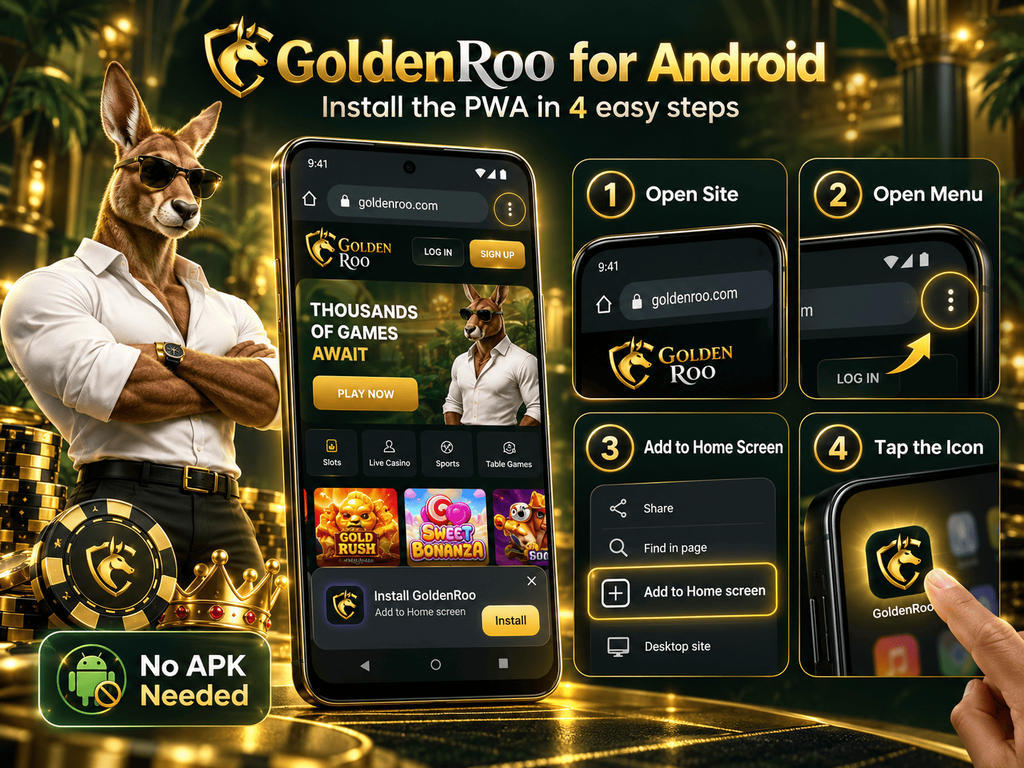
There is no need for an APK file for a browser-based PWA. Never download APK files from any unknown websites just because they claim to be the “official” Android apps of GoldenRoo.
Installation Guide for Apple Devices on iOS
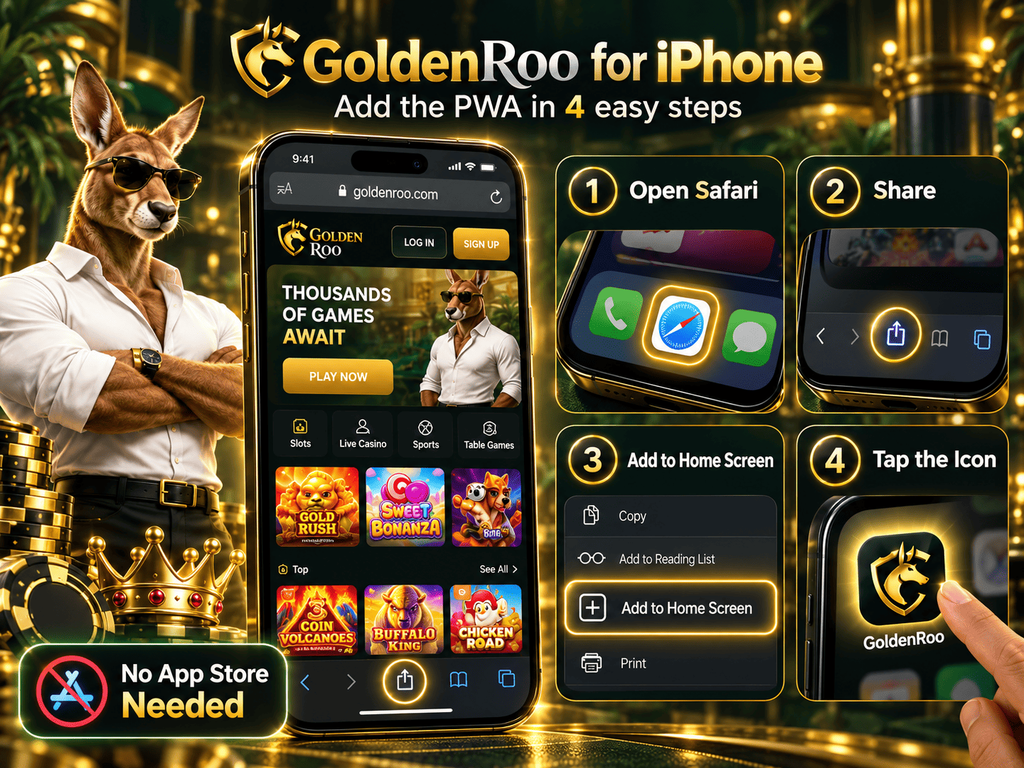
Installation of GoldenRoo on iPhone/iPad can be done via Safari:
- Open the casino in Safari and let the site fully load.
- Press the Share button to display the menu of actions for the opened page.
- Select “Add to Home Screen” in the menu.
- Check the name of the shortcut that is generated automatically and change it, if necessary.
- Press the “Add” button to create the shortcut to GoldenRoo on your iOS device.
- Launch the shortcut from the home screen every time you wish to use the service.
This shortcut becomes an easy way to gain access to the casino, but not a separate application downloaded from the App Store, default to iOS. It can be moved or added to a folder like other icons on the home screen.
Main Gambling Lobby on Mobile
The mobile lobby features a neat interface that is adjusted specifically for touch controls. The menu includes the categories “Top”, “New”, “Slots” and “Live Casino”. Besides, the game can be found with the help of the “Providers” option, which allows you to search for a certain title via providers. There is also a “Last Played” category, which allows finding previously opened titles.
If users want to make a search for particular games, then it can be done by choosing the “Games” and “Providers” tabs as well as searching directly in the corresponding field. Users can pick past search phrases, and the results will display the recommended games along with their software providers like Pragmatic Play, Play’n GO and BGaming.
Pokies and Other Genres in GoldernRoo PWA
The mobile catalogue of GoldenRoo features the same range of gaming options, out of which pokies make up the majority. Besides the main reel-spinning section, the platform also features dedicated tabs for games in the categories of Megaways, Bonus Buy, Bonus Wager, and Instant Wins.
Depending on the title, games may be played in demo or for real money. In Bonus Buy slots, players get an option to buy access to the bonus round with a specific sum of money instead of waiting. On mobile devices, games are displayed in full-screen mode with info (RTP, volatility, paytable) and controls for sound, betting, and autoplay. The platform also provides access to live casino and table games, including roulette, poker, baccarat, and game shows.
Account Features
Golden Roo has made account management simple through the mobile layout, where one can perform a login and use the wallet functionality without the need to switch to a desktop computer.
Once logged in, one can view their balance, go into the Deposit section, choose the payment method offered by GoldenRoo, enter the amount and fund your balance. The Withdrawal tab will give you the way out to request payouts, with the possible payment methods being presented. Account activity and funds can also be viewed through the mobile layout.
The bonus section can be viewed together with the account management section, where VIP and loyalty options offer the way in which one can view their status and rewards. Also, you can view all available bonuses through the main menu and all mobile bonuses that you can claim at the moment in your account area.
Browser Compatibility, Security, and Support
GoldenRoo casino can be accessed via modern mobile browsing apps like Google Chrome, Safari, Microsoft Edge, and Firefox. Staying up-to-date with the latest updates of your browser and device OS will help keep it compatible with the latest features of the service.
Beyond that, Aussie players must make sure to use the HTTPS version of the website before completing a login and making any payments. In case of any issues related to the account or website, mobile gamblers have access to customer support services right from the casino’s website or in the progressive app.
You must always visit the official website of GoldenRoo rather than using the APK files downloaded elsewhere.
GoldenRoo PWA FAQ
What is GoldenRoo’s progressive web app?
It’s the web version of the casino made for mobile phones. This progressive app can be added to your phone’s home screen for faster and easier access.
How can I get GoldenRoo on Android?
Open the GoldenRoo website on your phone using a browser that supports PWA installation. Open the browser menu, choose the available Add to Home Screen or Install option, and confirm.
How can I add Golden Roo to iPhone?
Open GoldenRoo in Safari, tap the Share button, select “Add to Home Screen”, check the shortcut name and press “Add”.
Can I play Bonus Buy pokies on mobile too?
Yes. Open the Bonus Buy category from the casino menu and choose from the available pokies on your mobile device.
Is an APK required for mobile play?
No. The GoldenRoo progressive web app does not require an APK or another installation file. It runs through your mobile browser. Avoid APK files offered by unknown third-party sites.